















Software updates often go unnoticed. Yet in the field of additive manufacturing, certain releases have a tangible impact on how parts are prepared before production. Version Cura 5.12 fits precisely into this approach: fewer flashy features, but a series of targeted improvements that directly influence part quality and workflow efficiency.
Rather than adding numerous new functions, this release focuses on very concrete points: better bridge handling, faster infill patterns, more consistent settings, and more accurate time estimation. Combined, these refinements can make a real difference when preparing complex models or running multiple jobs in succession.
In this article, we will examine in detail what changes with Cura 5.12, assessing the practical impacts for users: surface precision, internal infill optimization, seam placement, and new post-processing possibilities.
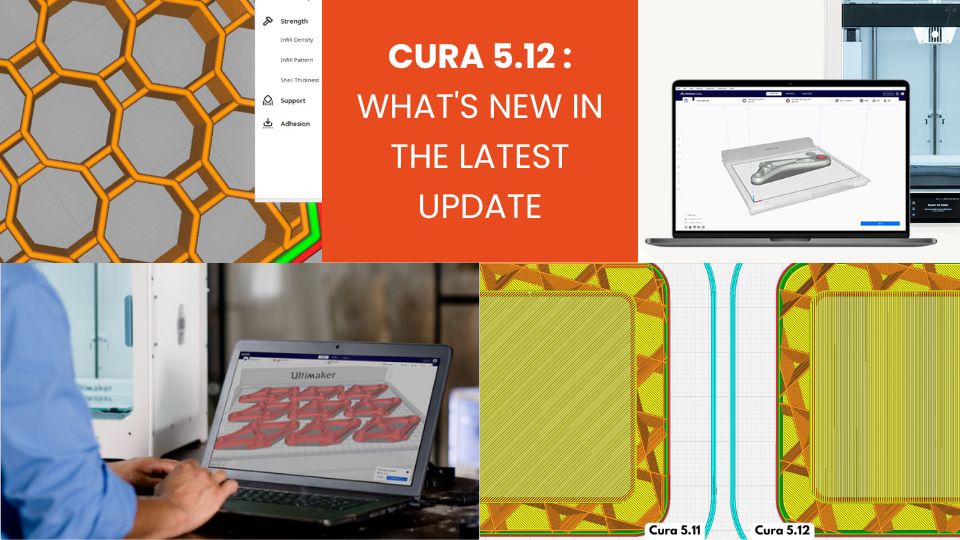
A Reliability-Focused Evolution with Cura 5.12
Over the past few years, Cura has evolved rapidly with the addition of many advanced settings. Some versions opened up more adjustment options for experienced users.
With Cura 5.12, the approach is different: the goal is to improve practical slicing performance without complicating the interface.
In practice, this means:
- better-calculated toolpaths
- reduction of visual artifacts
- more consistent behavior on complex geometries
- smarter default settings
For regular users, these optimizations often translate into less rework, fewer trial runs, and more predictable production.
Cura 5.12: Improved Bridge and Fine Feature Management
Bridges are among the most delicate areas when producing a part. When material must span a void without direct support, path stability is critical.
Cura 5.12 particularly improves the management of bridges on non-rectangular surfaces. On complex models—such as those with rounded openings or inclined cavities—the algorithm now generates more consistent paths.
Practical Outcome
In many cases, this results in:
- – tighter bridges
- – less sagging
- – cleaner bottom surfaces
These improvements are especially noticeable on parts with technical openings, internal channels, or curved/organic shapes.
Smarter Travel Behavior
Another optimization concerns the Combing feature, which manages non-extrusion movements. Previously, these moves could cross visible areas of the model, leaving thin strands of material behind.
The new logic prioritizes internal areas, avoids external walls, and reduces visible travel marks.
This reduces visible material traces, defects on fine features, and marks in aesthetic zones.
On detailed or mechanical parts, this change significantly enhances visual quality.
Improved Z Seam Handling in Cura 5.12
The Z seam corresponds to where each layer begins or ends. On some parts, it can appear as a faint vertical line.
Cura 5.12 introduces a new positioning mode called “Middle”, which distributes the seam more evenly.
This setting provides greater flexibility to:
- – control the aesthetic appearance of a part
- – hide seams in certain areas
- – prevent visible material build-up
Two New Infill Patterns
Internal infill plays a key role in mechanical strength and material usage.
Cura 5.12 introduces two new patterns:
- – Honeycomb
- – Octagon
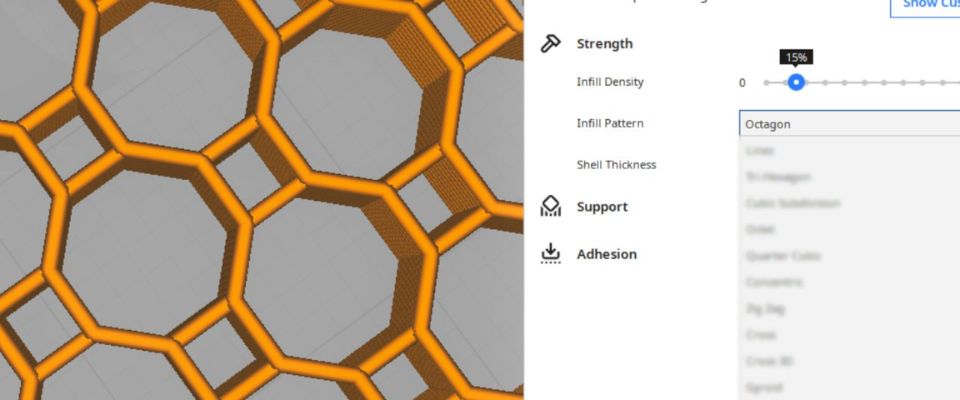
These structures were designed with two main objectives: fast calculation and execution and better stability at high speeds.
Unlike some older patterns, these structures do not self-intersect.
Why Self-Intersection Matters
Popular patterns like Grid, Triangular, or Cubic can cross paths during deposition. At higher speeds, this can cause vibrations, micro-deposits, or visible surface irregularities.
The new patterns avoid this issue using a different geometric structure.
The result: smoother motion, fewer surface artifacts, and more stable high-speed production.
More Consistent Infill Settings
Two new parameters improve the interaction between external walls and internal infill.
Infill Start / End Move Inwards Length
This adds a slight inward movement before starting and ending the infill. The goal is simple: avoid starting extrusion directly at the external wall.
Without this, small bulges can appear on external surfaces.
With this new behavior:
- – nozzle pressure stabilizes before reaching the wall
- – external surfaces stay cleaner
Infill Skin Support
Previously, multiple parameters influenced the relationship between infill and surface layers. Cura 5.12 simplifies this logic with a single clearer control.
This allows:
- – more consistent slicing
- – optimized mechanical strength
- – simplified settings
More Accurate Time Estimates
One commonly criticized aspect of slicing software is the gap between estimated and actual print time.
Cura introduces a new parameter called Print Estimation Factor. This allows users to adjust estimates based on real machine performance. If estimates are consistently too high or low, the software can now be calibrated.
For those planning productions or batches, this helps to organize sessions, avoid surprises, and improve scheduling.
Improved Preview Mode in Cura 5.12
The Preview mode allows analysis of layer-by-layer slicing results. In Cura 5.12, the slider now shows both layer number and actual height.
This facilitates analysis of complex models, especially for:
- – identifying problematic areas
- – understanding support behavior
- – verifying transitions between internal structures
Practical Improvements for Everyday Use
Beyond slicing algorithms, Cura 5.12 also introduces several interface improvements for smoother operation.
- – warnings appear if a model is not visible due to a disabled extruder
- – contextual guidance assists with face selection while rotating a model
- – direct access to log files via the Help menu
These adjustments may seem minor but reduce friction during intensive use.
A Subtle but Significant Update
Cura 5.12 does not aim to impress with a long list of features. Instead, it clearly focuses on enhancing the real user experience.
The main changes affect surface quality, infill stability, slicing accuracy, and estimate reliability.
Separately, each tweak may seem modest, but together they make the part preparation process smoother and more predictable.
Why This Update Matters
In an additive workflow, slicing software plays a crucial role. Even with high-performance hardware, poor slicing can lead to:
- – uneven surfaces
- – fragile bridges
- – excessive material usage
- – wasted print time
Cura 5.12 demonstrates that optimization often comes from small, targeted improvements rather than flashy new features.
For regular users, these enhancements translate to fewer manual adjustments, more consistent results, and higher overall quality.
Ultimaker Cura continues to advance through algorithm updates and contributions from the open-source community.
✅ Why Choose Polyfab3D?
Premium Support and After-Sales Service: Starting from your needs, we will guide you to the most suitable solution and provide long-term support for its implementation and daily use.
Official Reseller: Polyfab3D is a certified reseller of top brands, ensuring you get official products, exclusive access to the latest innovations, and priority technical support.
Fast Delivery and Customer Satisfaction: Polyfab3D is committed to providing you with an optimal and fast experience. Positive feedback from our customers rewards us and proves the reliability and efficiency of our service.
Contact us now for a personalized recommendation tailored to your needs, budget, and ambitions.